Hashwarp
Open source · No feeThe official miner for Parallax
Hashwarp mines XHash on NVIDIA and AMD GPUs, on a pool or solo on your own node. It is open source, takes no fee, and watches every card's temperature while it works.
 HiveOS
 mmpOS
mmpOSBuilds for Linux and Windows
Linux and Windows · CUDA and OpenCL
01Quick start
Mining in one command
Run it without arguments and a short wizard sets it up. Or give it a pool and your address, and it starts.
A wizard on first run
It asks whether you mine on a pool or solo, offers the Parallax pools that take an address, saves the answers to hashwarp.json and starts. Next time it starts straight away.
Every pool's stratum
EthereumStratum 1.0, EthProxy and plain Stratum, detected from the pool, and EthereumStratum 2.0 when you ask for it. With TLS and failover pools. If a pool drops, it reconnects with backoff and never gives up the only pool it has.
One file for a whole farm
Every option works on the command line or in a JSON file. Copy one hashwarp.json to every rig and override what differs on the command line.
./hashwarpStarts the wizard. The answers are saved for next time.
02Console
Everything a rig needs to tell you
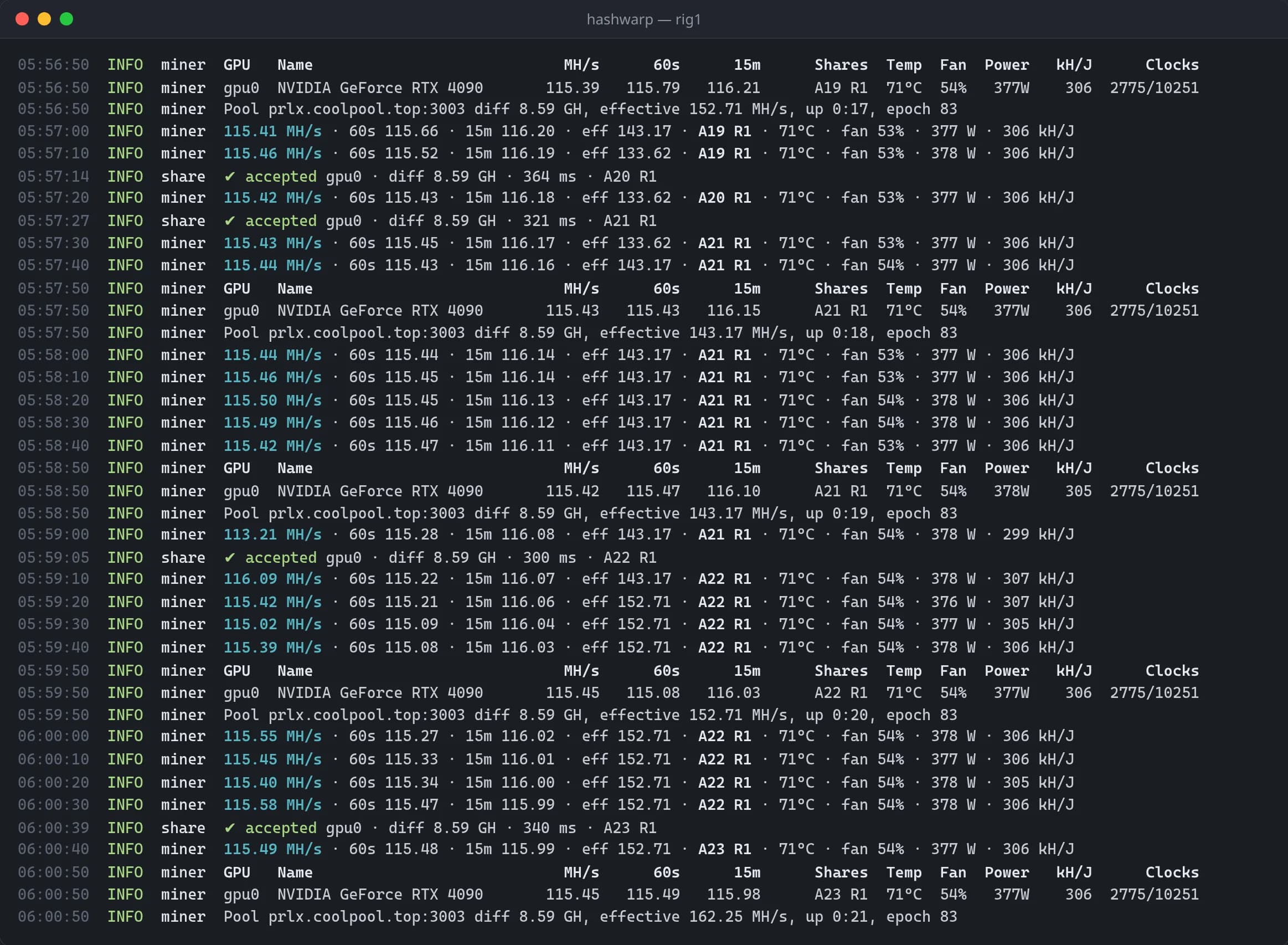
Hashrate, temperatures and every share, on one screen you can read at a glance.
Hashrate you can trust
1 and 15 minute averages beside the effective hashrate the pool sees, so a drop shows up before the payout does.
A row for every GPU
Hashrate, temperatures, fan speed, power draw and efficiency for each card.
One line per share
Each share with its difficulty and latency, and when a pool rejects one, the reason it gave.
Tuned at start
On NVIDIA cards, Hashwarp times its two search kernels on each GPU at start and keeps the faster one.
Keys while it mines
- h
- Show these keys
- s
- Statistics
- p / r
- Pause or resume all GPUs
- 0–9
- Pause or resume one GPU
- c
- Connection details
- l
- Debug output
- q
- Quit
03Safety
Built to run unattended
Rigs run overnight and in back rooms. Hashwarp protects the cards and tells your scripts what happened.
Temperature limits
Pause a GPU when its core, memory or hotspot reaches a limit, and resume it once it cools. One value for all cards, or one per card.
A last-resort stop
Stop mining entirely if any GPU reaches the temperature you set.
A watchdog
Restarts a GPU whose mining failed. If a card stops responding, it runs a script of yours, to reboot the rig for example, and exits with its own code.
Every share checked
Each solution is verified on the CPU before it's submitted, so an overclock pushed too far shows up as bad results on that GPU, not as rejected shares.
A self-test
hashwarp --selftest mines offline for up to 30 seconds and checks every GPU's results. Run it after changing drivers or an overclock.
Through every epoch
The DAG changes about every five days. If building it fails on a GPU, Hashwarp retries instead of leaving the card idle.
Exit codes for your scripts
04Monitoring
Watch every rig from one place
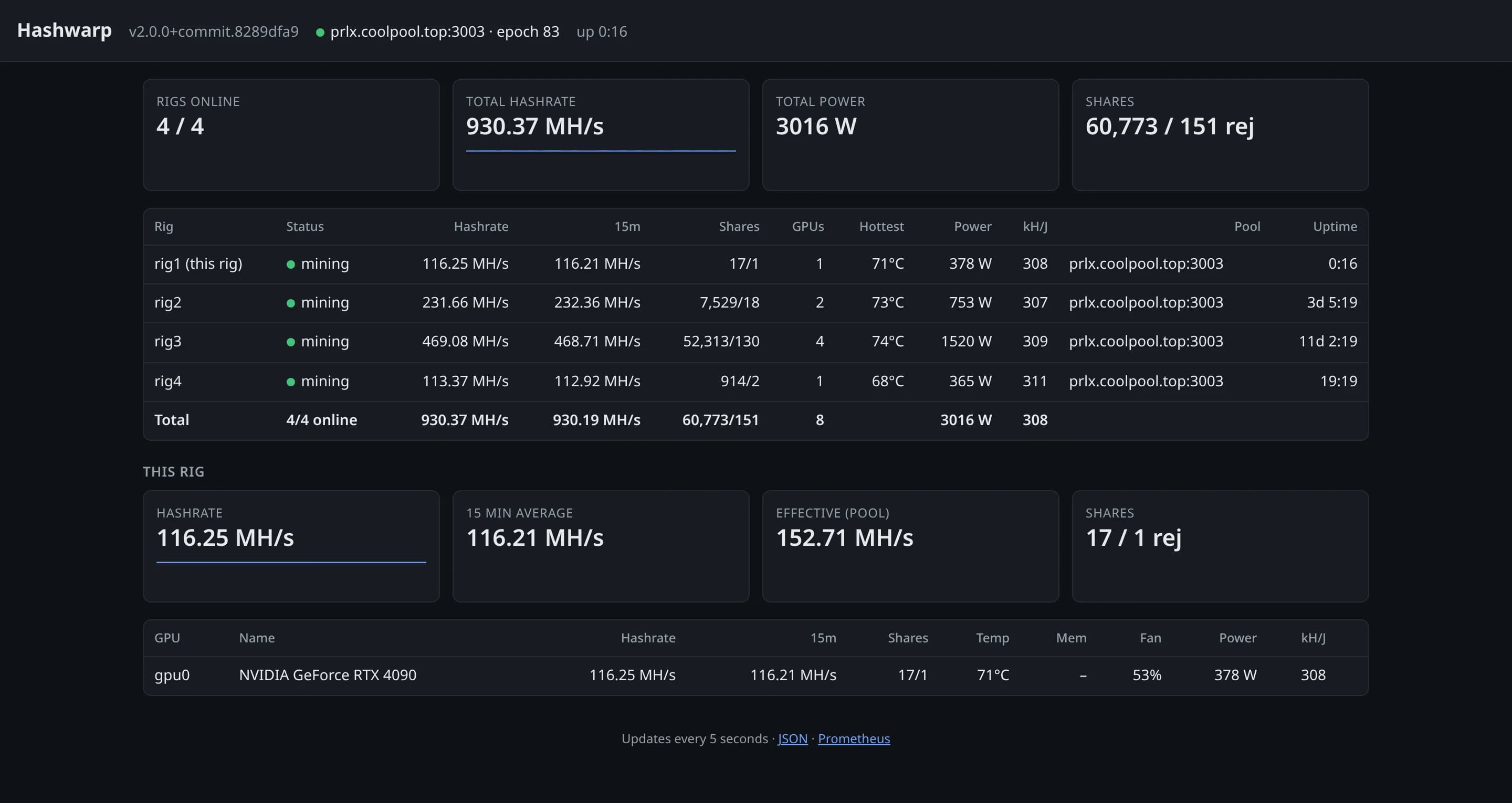
Turn on the API and each rig serves a dashboard, a JSON summary and Prometheus metrics.
A web dashboard
Hashrate, shares and every GPU's temperatures in a browser, for this rig and any others you add with --rig.
A JSON API
A summary at /api/v1/summary for your own scripts and tools.
Prometheus metrics
/metrics for Grafana dashboards and alerts across a farm.
Closed unless you open it
Add a token to require one on every request. Pausing, resuming and restarting from the API stay off until you allow them.
Turn it on
hashwarp --api-bind 127.0.0.1:21550 --api-token <token>
- http://127.0.0.1:21550
- /api/v1/summary
- /metrics
05Rig operating systems
Ready for HiveOS and mmpOS
Each Linux release has a package for both, reporting hashrate, shares, temperatures and fans to the rig OS.
HiveOS
Add it to a flight sheet as a custom miner:
- Miner name
- hashwarp
- Installation URL
- hashwarp-<version>.tar.gz
- Hash algorithm
- xhash
- Wallet and worker
- %WAL%.%WORKER_NAME%
mmpOS
Create a miner profile with the Custom miner type, and give it the download URL of the release's mmpOS package, the one ending in -mmpos.tgz, and a pool. Extra Hashwarp options go after the arguments.
Both rig OSes restart Hashwarp when it exits, which is what its watchdog relies on.
06Download
Get Hashwarp
Free and open source under GPL-3.0, for Linux and Windows.
Builds for Linux and Windows
What it needs
- NVIDIA
- Driver 525 or newer
- AMD
- The AMD driver with OpenCL (ROCm or Adrenalin)
- Linux
- glibc 2.28 or newer: Ubuntu 20.04, Debian 10, RHEL 8 and later, current HiveOS and mmpOS
- Windows
- Windows 10 or newer; the Visual C++ runtime comes in the archive